
How to Identify Ideal Customer Questions in AI Answer Engines
Actionable guide to mining buyer questions from logs and AI engines, clustering for intent, and linking results to conversions.
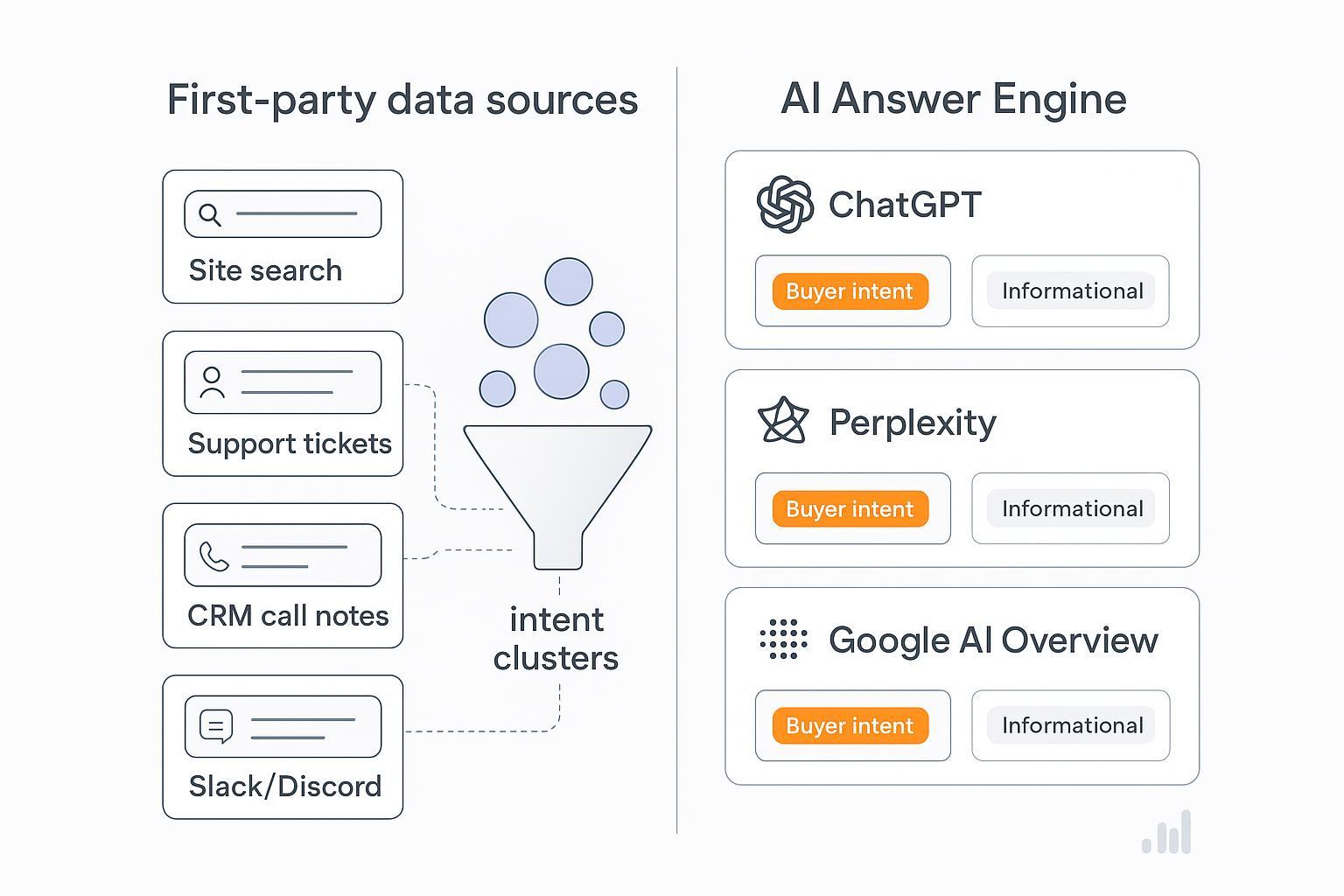
When AI answer engines respond, they don’t rank pages—they rank ideas. Your job is to surface the exact questions ideal customers ask, then make sure those questions pull your brand into the synthesized answers. This guide walks you through a practical, end-to-end workflow: mine first-party logs, probe ChatGPT, Perplexity, and Google AI Overviews differently, rapidly cluster questions to separate buyer intent from noise, and validate with conversion signals.
Key takeaways
Treat questions as the atomic unit of AI visibility, not keywords or titles.
Build your corpus from first-party logs (site search, support, CRM, community, NPS) and engine probes with reproducible capture.
Use embeddings + HDBSCAN/agglomerative to cluster and label buyer intent vs. informational.
Tie top clusters to GA4 key events and CRM outcomes; monitor drift and re-run regularly.
Keep privacy and consent front-and-center; pseudonymize before analysis.
1) Mine first‑party logs, normalize, and protect privacy
Your best seeds live in your own systems. Pull questions from site search and FAQ logs (queries, clicks, dwell on answers), support tickets and chats (Zendesk/Intercom) with resolution context, sales call notes and emails (HubSpot/Salesforce) for pricing, integration, and procurement friction, and community threads (Slack/Discord) plus NPS open text for raw, colloquial intent.
Export tips and realities: Zendesk allows full account exports (JSON/CSV/XML) and incremental APIs; JSON preserves comments, which are often the richest signals. See Exporting ticket, user, or organization data (2025-12-26). For quick CSVs of views, note comment limits in Exporting a view of tickets to a CSV file (2025-12-23). Intercom offers dataset exports and APIs for conversation content; start with Export your conversations data (2025-12-24). HubSpot and Salesforce support report- and object-level exports for calls, tasks, and notes. See Export your records (HubSpot) (2025-12-27) and Data Export FAQ (Salesforce). Slack exports vary by plan; Enterprise Grid enables broader, governed exports. Start with View your Slack analytics dashboard (2025-12-26) and review API/terms in Slack API Terms. Discord provides user-level data packages; it’s not a server-wide export. See Your Discord Data Package.
Normalize before analysis. A minimal schema:
{
    "source_system": "zendesk|intercom|hubspot|salesforce|slack|discord|site_search|nps",
    "record_id": "string",
    "timestamp": "ISO-8601",
    "user_role": "customer|agent|prospect",
    "channel": "web|phone|chat|community",
    "raw_text": "string",
    "normalized_text": "string",
    "language": "en|…",
    "session_id": "string",
    "product_tags": ["pricing","integration","security"],
    "resolution": "resolved|unresolved|handoff_to_sales",
    "follow_up_links": ["https://…"],
    "PII_masked": true,
    "pii_fields_removed": ["email","phone"],
    "consent_flag": true,
    "behavioral": {
      "clicks_on_results": 3,
      "dwell_time_on_answer": 42,
      "follow_up_count": 1,
      "conversion_event_id": "evt_123"
    }
  }
Privacy and retention: Pseudonymize identifiers and limit free-text exposure. The EDPB’s Guidelines on pseudonymisation (2025) and legitimate interest framing in Guidelines on Art. 6(1)(f) (2024) offer anchors. CPRA stresses “reasonably necessary and proportionate” data use; see the CPPA’s Enforcement Advisory 2024-01 and the California AG’s CCPA overview.
Time/effort: Expect 1–2 days for initial exports and normalization for a mid-sized team; faster if your help desk and CRM have clean tagging.
2) Probe ChatGPT, Perplexity, and Google AI Overviews—differently
Each engine has its own behavior. You’ll get higher-quality questions if you adapt your probing.
ChatGPT (Search mode and reasoning): Use conversational probing with explicit constraints. Ask for “top 25 questions buyers ask before purchase,” then probe follow-ups like “separate pricing vs. technical validation vs. compliance.” ChatGPT Search provides timely answers with citations; see Introducing ChatGPT Search (2024-10-31). For programmatic capture with source metadata, consult OpenAI’s deep research guide.
Perplexity (Deep Research and threads): Run Deep Research for multi-step synthesis with inline citations. You can export threads to PDF/Markdown/DOCX; see Introducing Perplexity Deep Research and What is a Thread? (2025-12-25).
Google AI Overviews (SERP context): Capture AIO summaries with their linked sources. Google advises focusing on crawlability, helpful content, structured data aligned with visible content, and page experience; see AI features and your website (2025-12-26). Use reproducible queries with operators like site:, quotes, and date scopes (before:/after: where supported). For boolean operator references, see Programmable Search JSON API.
Prompt recipes: seed → expand → paraphrase
Seed (from logs):
  “Does your enterprise plan include SSO and SCIM provisioning?”

  Expand (engine probe):
  “List 20 closely related buyer questions that indicate readiness to purchase an enterprise plan for [PRODUCT], separating pricing, security/compliance, and integration.”

  Paraphrase (guardrails):
  “Rewrite each question in 2–3 ways that preserve intent; flag any paraphrase with uncertainty > 0.3.”

  Persona contrast:
  “From the perspective of a security lead vs. a procurement manager, list their distinct pre-purchase questions about SSO/SCIM.”
Guardrails matter. Use clear task decomposition and few-shot exemplars; see PromptingGuide techniques and OpenAI’s prompt engineering best practices (2025-11-12).
Capture playbook: ChatGPT—copy prompt + full response with citations; optionally export account data as JSON for audit. Perplexity—export threads and store the report with citation URLs. Google AIO—record the query, timestamp/SERP URL, screenshot, and the links shown in the Overview.
3) Rapid clustering to separate buyer intent from informational noise
Think of clustering like sorting questions into labeled bins: “ready to buy” vs. “just learning.” Embeddings turn text into vectors; clustering groups similar questions.
Practical defaults: Use sentence-transformers for embeddings. For speed on short questions, choose all-MiniLM-L6-v2; for quality, try all-mpnet-base-v2. See the Sentence-Transformers docs. Reduce noise with UMAP (n_neighbors 15–50; min_dist 0.0–0.3) or PCA. For clustering, HDBSCAN with min_cluster_size 10–25 and min_samples 5–15 works well on short QA; enable prediction_data for soft assignments. See HDBSCAN parameter guidance. If you prefer a fixed number of clusters, use Agglomerative (Ward for Euclidean; average linkage with cosine) per scikit-learn clustering guides.
A small, reproducible example (Python):
# pip install sentence-transformers umap-learn hdbscan scikit-learn
  from sentence_transformers import SentenceTransformer
  import umap
  import hdbscan

  questions = [
    "Does your enterprise plan include SSO and SCIM?",
    "How much is the annual price for 100 seats?",
    "What is SCIM provisioning?",
    "Can we integrate with Okta and Azure AD?",
    "Is there a discount for nonprofits?",
    "SSO setup steps for Okta?"
  ]

  # 1) Embeddings
  model = SentenceTransformer('all-MiniLM-L6-v2')
  X = model.encode(questions, normalize_embeddings=True)

  # 2) Dimensionality reduction
  umap_reducer = umap.UMAP(n_neighbors=25, min_dist=0.0, n_components=10, random_state=42)
  Xr = umap_reducer.fit_transform(X)

  # 3) Clustering
  clusterer = hdbscan.HDBSCAN(min_cluster_size=3, min_samples=5, metric='euclidean', cluster_selection_method='eom')
  labels = clusterer.fit_predict(Xr)

  # 4) Label buyer intent vs informational using simple lexical cues
  import re
  buyer_signals = [bool(re.search(r"price|annual|seats|discount", q, re.I)) for q in questions]
  intent_labels = ["buyer_intent" if s else "informational" for s in buyer_signals]

  print(list(zip(questions, labels, intent_labels)))
Intent labeling signals show up in pricing, contract terms, seat counts, procurement language, implementation timelines, and “switch from competitor” phrasing. Informational signals are definitions (“what is”), generic how-tos without product context, or academic curiosity.
Human-in-the-loop review: skim exemplars per cluster, accept/merge/split, and flag low-confidence assignments. Keep a short rubric that defines “buyer intent” for your product lines so reviewers stay consistent.
Scaling retrieval: For larger corpora, use FAISS—Flat for small sets, HNSW for high recall/low latency, IVF + PQ/SQ for compression trade-offs. See the FAISS index factory overview.
4) Validate clusters with conversion signals and monitor
Clusters aren’t useful until they connect to outcomes. Map the top buyer-intent clusters to GA4 key events such as demo bookings, pricing page views, add-to-cart, or quote requests. Configure key events under Admin > Events—Google explains the difference between conversions and key events in Conversions vs. key events in GA4 (2025-12-16). In your CRM (HubSpot/Salesforce), correlate exposure to content aligned with a cluster against pipeline stages like Qualified, Proposal, and Closed Won to estimate conversion propensity.
For the top clusters, create targeted assets—landing pages, comparison guides, pricing explainers—and A/B test CTAs tied to the cluster’s dominant questions. Track uplift, noise reduction, and stability over 4–6 weeks.
For deeper context on why AI answer visibility matters, see What Is AI Visibility? Brand Exposure in AI Search Explained. For multi-engine behaviors, see ChatGPT vs Perplexity vs Gemini vs Bing: AI Search Monitoring Comparison. For auditing your footprint, see How to perform an AI visibility audit for your brand.
Optional monitoring tool example: Disclosure: Geneo is our product. Teams use it to track how often their intent clusters appear (by proxy: mentions/links/topics) across ChatGPT, Perplexity, and Google AI Overviews, and to compare visibility against competitors over time. It’s helpful for white-label reporting and trend monitoring; it’s not required for the mining or clustering steps above.
Drift and seasonality: re-run probes monthly, version prompts, and compare cluster stability. If a buyer-intent cluster weakens, inspect whether pricing pages or integration docs fell out of cited sources.
5) Troubleshooting and operating safeguards
Sparse or noisy logs? Expand your time window, combine multiple sources, and generate paraphrases from seeds with uncertainty flags. Focus on questions carrying buyer signals such as pricing, seat counts, and timelines.
Hallucinated or low-quality citations? Re-run with stricter prompts (e.g., “only cite original docs and recognized publishers”) and verify links. ChatGPT Search and Perplexity both provide inline citations—follow them and spot-check.
Multilingual data? Detect language automatically; use multilingual embeddings or translate prior to clustering; retain original text for audit.
Export limitations and governance? Slack and Discord have plan/scope constraints; stick to official export paths and terms. Maintain access controls and a documented retention schedule (e.g., 6–12 months for raw support text, longer for anonymized aggregates).
Measurement stalling? If GA4 events aren’t tied, instrument missing CTAs (demo, pricing, contact), then re-map clusters. Keep a simple dashboard: cluster volume, percent buyer-intent, and conversion rate for content aligned to each top cluster.
Action checklist
Export and normalize first-party logs; mask PII and set retention windows.
Probe ChatGPT, Perplexity, and Google AI Overviews with structured prompts; capture outputs with citations.
Embed and cluster questions (HDBSCAN/agglomerative); label buyer intent; run human QA.
Map top clusters to GA4 key events and CRM outcomes; launch A/B content experiments.
Monitor monthly; compare visibility across engines; iterate on prompts and content.