
A Technical Breakdown of AI Search Crawling
Learn what AI search crawling means, how bots access your site, and which controls (like robots.txt) affect AI and traditional crawlers. Actionable, source-backed.
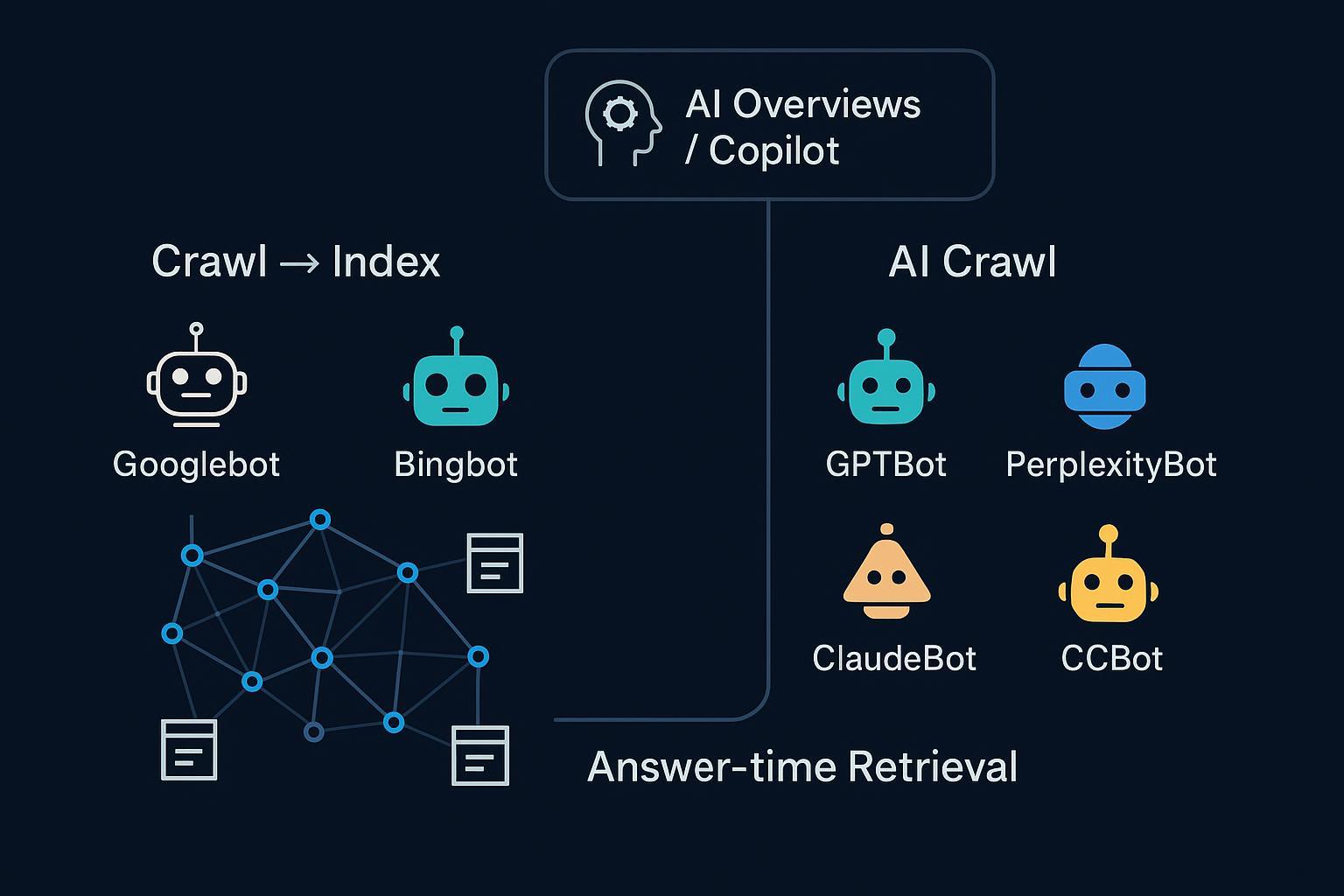
“AI search crawling” gets used to describe a few different things—some of which have nothing to do with each other at runtime. If you’re trying to control access, understand eligibility for AI answers, or debug why your site isn’t cited, you need a clean mental model. Here’s the deal: there are three overlapping modes that matter.
1) The three modes of web discovery and retrieval
- Traditional search crawling and indexing: classic engines discover, fetch, render, and index pages (for example, Googlebot, Bingbot). AI features inside those engines reuse this index.
- AI-oriented crawling/training: LLM vendors (for example, OpenAI, Perplexity, Anthropic) run their own crawlers to fetch public content for training and answer systems, governed by robots.txt.
- Answer-time retrieval: some systems fetch or retrieve content at query time, usually over an existing index (for example, Bing index for Copilot) or from allowed sources.
Think of the web as a city with three highways feeding the downtown of answers: the search index highway, AI vendors’ own crawlers, and a fast lane that pulls what it needs at the moment you ask.
| Mode | Primary purpose | Example bots/systems | How content is fetched | Primary controls | Typical output use |
|---|---|---|---|---|---|
| Traditional search crawl → index | Build and maintain a searchable index | Googlebot, Bingbot | Scheduled crawling; selective JS rendering | robots.txt, robots meta | Web results, snippets, engine-owned AI features |
| AI-oriented crawling/training | Gather data for LLM training or AI answers | GPTBot (OpenAI), PerplexityBot, ClaudeBot, CCBot | Periodic fetch; often static HTML | robots.txt; vendor IP lists (where published) | Model training, answer ranking/grounding |
| Answer-time retrieval | Fetch or retrieve sources to ground answers | Copilot web mode, some answer engines | Query-time retrieval over indexes/APIs | Standard index eligibility; robots.txt for fetchers | Cited links, grounded responses |
2) What actually powers AI Overviews and Copilot Search
Two big misconceptions cause most confusion:
-
Google’s AI Overviews do not operate a brand-new crawler for each query. They generate over Google’s existing Search index and surface a wider set of helpful links if your page is eligible for snippets. Google explains controls and eligibility in the official guidance, “AI features and your website” by Google Search Central, which emphasizes normal Search controls like robots.txt and page-level directives. See the details in Google’s documentation: Google Search Central — AI features and your website.
-
Microsoft Copilot (web mode) grounds answers via the Bing index using a RAG pattern. Copilot forms a focused query, retrieves results via Bing APIs, applies provenance checks, and cites sources. Microsoft documents this behavior here: Microsoft Copilot Studio — Generative answers based on public websites.
There’s no special “AI allow” tag you need to add. Standard crawling and indexing controls still govern whether your content can be discovered and cited. If you want to zoom out from mechanics into strategy, start with our primer, What Is AI Visibility? Brand Exposure in AI Search Explained.
3) User-agents that matter—and the controls that actually work
Reputable vendors publish the user-agents (UAs) their bots use and how they respect robots.txt:
- OpenAI: GPTBot is the crawler associated with training and certain answer systems. Opt-out via robots.txt. See: OpenAI — Bots overview and GPTBot controls.
- Perplexity: PerplexityBot and Perplexity-User are documented, with robots.txt adherence and published IP JSONs for verification. See: Perplexity — Bot user-agents and controls.
- Anthropic: ClaudeBot honors robots.txt; Anthropic explains how to block it in support docs. See: Anthropic Support — Does Anthropic crawl data and how to block.
- Common Crawl: CCBot follows robots.txt and can respect crawl-delay. See: Common Crawl — FAQ.
- Google’s Search crawlers (for example, Googlebot) and non-Search crawlers (for example, GoogleOther) observe robots.txt; Search behavior and directives are documented here: Google Search Central — Introduction to robots.txt.
Practical points worth noting:
- robots.txt is advisory. Reputable bots follow it, but attackers and scrapers may not. For compliance and rate control, pair robots rules with infrastructure measures where needed.
- Some vendors publish IP lists (for example, OpenAI, Perplexity). Others don’t. Use what’s available to verify identity and set allow/deny lists.
- You can treat different Google crawlers differently. For example, block GoogleOther (used by non-Search teams) while allowing Googlebot.
Below are sample robots.txt patterns. Always test and monitor your logs.
# Block training-only crawler (OpenAI GPTBot), allow Googlebot/Bingbot
  User-agent: GPTBot
  Disallow: /

  User-agent: Googlebot
  Allow: /

  User-agent: Bingbot
  Allow: /

  # Block Perplexity’s crawler but leave traditional engines open
  User-agent: PerplexityBot
  Disallow: /

  # Slow down Common Crawl if needed
  User-agent: CCBot
  Crawl-delay: 2

  # Block GoogleOther (non-Search) but keep Googlebot allowed
  User-agent: GoogleOther
  Disallow: /
Use the exact UA tokens from vendor docs, and beware of typos or case mismatches.
4) Rendering realities: JavaScript vs static HTML
Googlebot can render JavaScript with a recent Chromium; it does this selectively at scale and may defer heavy work. That’s why many JS-heavy sites still adopt SSR or hydration to expose critical content. By contrast, most AI-oriented bots don’t publicly claim full JS execution. Conservative assumption? They fetch static HTML. So expose the essentials—titles, headings, core copy, canonical tags, and key schema—in the initial HTML response.
Think of it this way: search engines bring a headless browser to a lot of pages, while many AI bots bring a fast HTML fetcher. If your content only “lights up” after JS runs, some AI bots may never see it.
5) Verify and monitor bot activity in your logs
User-agent strings can be spoofed. When precision matters (for example, allowlists/denylists), verify identity with reverse DNS or published IP lists where available.
- Googlebot: reverse DNS should resolve to domains like .googlebot.com/.google.com, then forward-confirm the hostname. Google documents the method in Search Central.
- Bingbot: reverse DNS resolves to .search.msn.com; forward-confirm.
- OpenAI and Perplexity: compare requests against vendor-published IP JSONs and UA tokens.
- Anthropic: no fixed IP ranges; rely on robots.txt and rate-limiting at the edge if required.
Here’s a quick shell workflow you can adapt for investigations on a Linux/macOS host (replace example IP and log path):
# Filter probable bot hits by UA and inspect frequency
  zgrep -E "(Googlebot|Bingbot|GPTBot|PerplexityBot|ClaudeBot|CCBot)" /var/log/nginx/access.log* \
    | awk '{print $1, $12}' | sort | uniq -c | sort -nr | head -50

  # Reverse DNS a suspicious IP, then forward-confirm
  ip="203.0.113.25"; host $ip; host bot-203-0-113-25.example.com
Pattern spikes, odd hours, or identical paths across short intervals can signal aggressive crawling. Use infrastructure controls (WAF/CDN) to throttle or block while you refine robots rules.
6) Diagnose missing visibility or citations in AI answers
If your pages don’t appear as sources in AI summaries or answers, walk this checklist:
- Index eligibility: Is the page indexable and eligible for snippets? Blocked by robots.txt or a meta robots tag?
- Render dependency: Do key facts exist in static HTML, or only after client-side rendering?
- Canonicals and duplication: Is the right URL canonicalized? Are variants splitting authority?
- Structured data: Do you provide schema that helps engines understand entities, products, or answers?
- Bot access: Did you accidentally block relevant UAs (for example, PerplexityBot) while allowing Googlebot?
- Authority and coverage: Are you seen as a trustworthy, comprehensive source compared to peers?
For the measurement and optimization side, these resources can help you define targets and evaluate progress:
- AI Search KPI Frameworks for Visibility, Sentiment, Conversion (2025)
- LLMO Metrics: Measuring Accuracy, Relevance, Personalization
7) Next steps
Start with fundamentals: keep essential content in static HTML, ensure index eligibility, and use robots.txt to grant or withhold access to specific AI bots. Verify activity with logs and, where possible, vendor IP lists. Iterate slowly—block with intent, measure impact, and document changes.
Disclosure: Geneo is our product. If you want to monitor whether your brand is being cited or mentioned across ChatGPT, Perplexity, and Google’s AI features—and track sentiment and history—have a look at Geneo.
Steady, evidence-based governance beats guesswork. Which of your controls would you test first this week?