
How to Leverage AI-Powered Form Data for Customer Insights & Content Creation (2025)
Learn 2025 best practices for AI-powered form data collection, actionable customer insights, and workflow-driven content creation. Ideal for marketers, agencies, and SaaS teams.
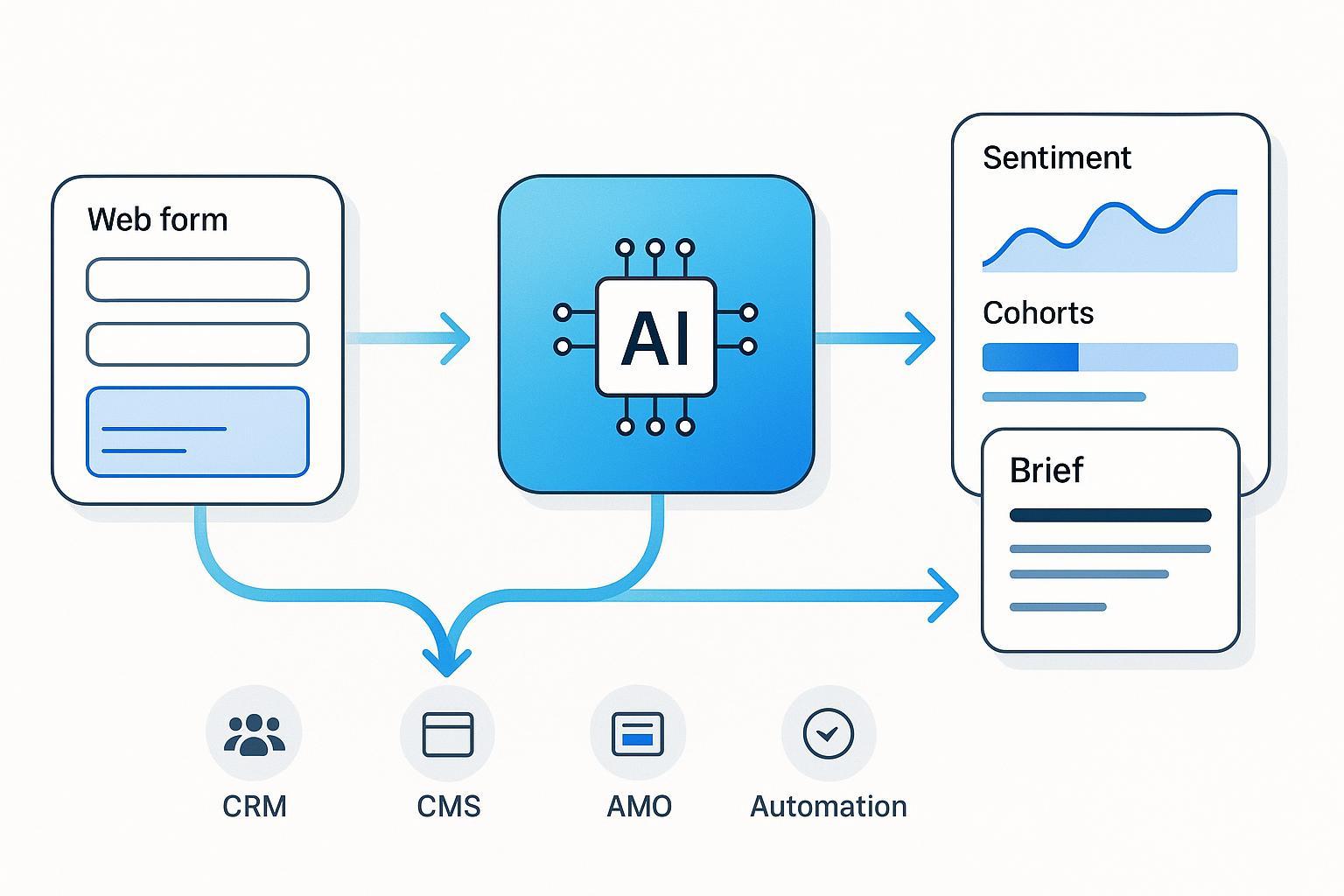
AI-powered forms have moved from novelty to necessity. Marketers are expected to convert traffic efficiently, extract real customer language, and turn those signals into content that resonates—at scale. While independent, peer-reviewed quantification of “AI-form” lifts is still scarce, we have reliable baselines and directional data: landing pages average single-digit conversion rates according to the Unbounce 2025 conversion baselines, while interactive form platforms have reported higher completion, such as the Typeform 2024 average completion rate of 47.3%. The deltas are driven by UX discipline—field minimization, conditional logic, mobile-first design—and increasingly by AI that reduces friction and surfaces smarter prompts.
This guide is hands-on. I’ll show the exact steps to design adaptive, compliant forms, wire your stack, apply AI for insight extraction, and operationalize a form-to-content pipeline that measurably improves engagement and conversions. We’ll be pragmatic about trade-offs, privacy constraints, and what to automate vs. what to keep human.
1) Design smarter, compliant forms (the inputs determine the insights)
Practical sequence I use on real implementations:
- Minimize fields (collect only what you’ll use in the next 90 days). Field count and clarity strongly affect completion. For instance, form benchmarks indicate that even small field reductions can yield noticeable conversion lifts, as summarized in the WPForms 2024 statistics overview. In practice, I aim for 3–5 required fields on first touch and defer deeper questions to follow-ups.
- Use conditional and progressive disclosure. Ask context-specific questions only when prior answers justify them. This increases perceived relevance and lowers cognitive load.
- Prefer multi-step over single long forms (with a visible progress indicator). Beyond aesthetics, this minimizes perceived effort and lets you personalize step 2+ based on step 1.
- Validate in-line, not after submission. Show friendly, specific error messages and accept partial saves where possible.
- Design for accessibility from the start. WCAG 2.2 expands criteria like accessible authentication and target size. Ensure programmatic labels, clear focus states, and keyboard operability following the W3C WCAG 2.2 technical report.
- Optimize for mobile-first behavior. Prioritize input type selection (email, number), large tap targets, and clear error recovery based on patterns seen in Baymard’s 2025 mobile UX research trends.
- Reduce bot friction without punishing humans. If you must use a challenge, test passive or low-friction options and monitor abandonment.
- Consent the right way. Use explicit, unbundled consent when required; no pre-ticked boxes; easy withdrawal. This is aligned with the GDPR’s legal basis and consent mechanics in the EUR-Lex text of Regulation (EU) 2016/679 (2016/2018+ enforcement). For California, ensure clear “notice at collection,” retention disclosure, and opt-out mechanisms consistent with the California Privacy Protection Agency’s CPRA guidance.
Quick checklist for form design and compliance readiness:
- 3–5 must-have fields on first contact; defer the rest
- Conditional questions tied to earlier answers
- In-line, friendly validation; allow partial-save and resume
- WCAG 2.2: labels, focus, target size, keyboard access; color contrast checked
- Mobile: appropriate keyboards, large tap targets, thumb-friendly layouts
- Bot mitigation that doesn’t add friction for real users
- Explicit consent + granular preferences; link to a concise privacy notice
Trade-offs to acknowledge:
- Fewer fields can mean more back-and-forth later—mitigate by progressive profiling in email/CRM journeys
- Multi-step forms add complexity—ensure step tracking works in analytics and respects consent
- Aggressive bot tools reduce spam but may reduce completion; test before standardizing
2) Wire your data stack for clean, connected signals
The most common failure mode I see is beautifully designed forms feeding into a messy data layer. Fix the plumbing early.
- Map each field to a single source of truth. Decide which system “owns” each attribute (CRM, CDP, MAP, data warehouse) and document required/optional status, format, and validation rules.
- Create IDs and keys you’ll use later. Store the form session ID, consent version, and UTM parameters; unify under a customer/profile ID for joining across tools.
- Normalize and deduplicate. Use deterministic and probabilistic matching conservatively; track confidence scores and surface potential merges for human review.
- Capture events, not just fields. Persist form_started, form_progressed (step X), form_submitted, consent_given, and declined events so you can analyze drop-offs and compliance.
- Set up real-time syncs to CRM/marketing automation. A successful pattern is: web form → event bus or webhook → enrichment service → CRM/MAP with clean attributes and events.
- Document DSAR-readiness (more in Section 6). Ensure you can retrieve, export, or delete data on deadline.
Signal hygiene rules of thumb:
- Make every attribute purpose-bound (why do we collect it?).
- Timebox retention (e.g., 12 months for lead forms unless re-consented).
- Track data lineage so you can explain “what, why, when, where.”
3) Extract insights with AI: from raw text to segments you can act on
Once your inputs are clean, AI shines on free-text and multi-select answers. What works consistently in practice:
- Classify at two levels: sentiment/emotion and topic/intent. Use aspect-based sentiment so you can tie opinions to product features or service moments.
- Extract entities and attributes. Identify product names, use cases, pain points, budget ranges, timeframe hints.
- Represent each respondent as a vector of attributes and sentiments. Cluster into segments (e.g., “Price-sensitive SMBs with urgency,” “Enterprise evaluators citing security”).
- Keep a human-in-the-loop. Review model drift, spot-check confusing cases, and update labels regularly.
- Monitor bias and fairness. Diversify training data and add governance checks before pushing segments to campaigns.
If you need a concise set of guardrails, the AlternaCX 2024 overview of sentiment analysis best practices aligns closely with what we deploy in production and emphasizes domain adaptation and ongoing evaluation.
Practical outputs to generate automatically:
- Top 5 intents and their share of respondents
- Emotional tone distribution by segment (e.g., % frustration around onboarding)
- “Jobs-to-be-done” summaries written in the customer’s words
- Content gaps: questions frequently asked that lack a strong resource
4) Operationalize: form → insights → content, as a repeatable workflow
Here’s a step-by-step recipe you can implement with common tools:
- Trigger on submission. Send payload (PII minimized) via webhook to an enrichment service.
- Run NLP jobs. Extract entities, intents, and aspect-level sentiment; normalize into a tidy schema.
- Update CRM/MAP. Attach segments, intent tags, and consent logs to the unified customer profile.
- Generate content briefs per segment. Include core questions, desired outcomes, emotional tone, and internal links to cornerstone content.
- Draft and edit. Let AI draft outlines and first passes; keep human editors responsible for accuracy, nuance, and brand.
- Personalize distribution. Map segments to channel tactics (email, blog, LPs) and dynamic blocks.
- Measure and learn. Attribute content performance back to the originating segments and intents; iterate the form questions quarterly.
For deeper implementation patterns that balance human judgment with automation, see our guide on best practices for content workflows and a complementary playbook for personalization at scale. If you’re still selecting tools, this concise workflow automation FAQ covers common orchestration options and trade-offs.
5) Example: implementing an AI form-to-content workflow in practice
Here’s a neutral, implementation-focused snapshot that mirrors how many teams execute this in 6–8 hours of work.
- Form setup. Build a 3-step form: basics (name, email, company size), problem framing (select top challenge; optional free text), and outcome preference (e.g., “case studies,” “how-to guides”).
- Eventing and enrichment. On submit, send a webhook payload to an NLP service. Extract entities and cluster intent; write back a segment label and top pain point.
- CRM and MAP updates. Create or update the contact; attach segment, intent, consent, and UTM fields.
- Content brief generation. For each segment, auto-create a one-page brief with outline, FAQs, and tone guidance. Editors review and approve.
- Publishing and tracking. Push the approved content to CMS, tag it with segment and intent, and set up dashboards to compare engagement by segment.
6) Micro-example using a dedicated AI content platform
When teams want to compress steps 4–5 and speed up publishing, a dedicated AI content platform can help orchestrate briefs, drafts, and publication.
- Ingest and segment. Export enriched form responses and upload or sync. Auto-generate segment summaries and brief templates.
- Draft and edit. Generate first drafts per segment, embed FAQs from recurring questions, and route to editors for fact-check and brand voice.
- Publish and measure. Push to CMS (or WordPress) with segment tags; monitor segment-level engagement.
A practical option is QuickCreator, an AI-powered content marketing and blogging platform that supports multilingual drafting, brief templates, and one-click WordPress publishing. Disclosure: QuickCreator is our product.
Note: keep this layer tool-agnostic in design. If you switch tools later, the data model (segments, intents, consent) and process remain stable.
7) Governance: privacy-by-design, DSAR readiness, accessibility, and i18n
Treat governance as a product requirement, not a compliance “afterthought.”
- Consent and logging. Store consent status, legal basis, timestamp, and policy version with each record. Allow easy withdrawal and preference edits.
- DSAR workflows. European requests must be fulfilled within one month (extendable by two), and California requests within 45 days (extendable by 45 with notice). These timelines are defined by GDPR and CPRA regulations; see the authoritative texts cited earlier. Build intake forms, verification steps, and export/delete automation.
- Data minimization and retention. Collect only what is necessary for the stated purpose (a core GDPR principle); timebox retention and delete unneeded data.
- Accessibility. Bake WCAG 2.2 criteria into design and QA: labels, error feedback, focus states, target size, and keyboard navigation.
- Internationalization. Use UTF-8, support RTL where needed, and localize date/number formats. Plan for text expansion and font coverage in your CSS.
Governance checklist you can copy:
- Consent logs tied to profile; preference center live
- DSAR intake + verification + export/delete automation
- Data inventory with purpose and retention per attribute
- WCAG 2.2 checks in CI (linting + manual QA for critical flows)
- UTF-8, RTL readiness, locale-aware formatting
8) Migration from legacy forms to AI-enhanced workflows
Most teams aren’t starting from scratch. Here’s how to migrate without breaking your funnel:
- Inventory and mapping. Catalog existing fields, validations, and destinations. Draft a target schema with segments/intents you plan to add.
- Pilot migration. Move one high-traffic form first; run parallel tracking and compare completion and data quality.
- Validation parity and enhancement. Ensure all old rules are replicated; add anomaly detection and parity checks to prevent quiet data loss. A concise 2025 overview of validation safeguards is outlined in the Quinnox guide to data migration validation best practices.
- Integration testing. Automate end-to-end tests for field mapping, consent propagation, and analytics events.
- Change management. Train stakeholders, communicate what’s new (and why), and plan rollbacks.
Common migration issues and fixes:
- Duplicate leads from webhook retries → add idempotency keys
- Missing consent on downstream records → propagate consent fields in every integration
- Broken attribution → capture UTMs and session IDs at step 1 and persist through submission
9) Pitfalls and troubleshooting (what trips teams most often)
- Over-collection. If you can’t justify an attribute’s purpose, remove it. It increases abandonment and complicates DSARs.
- Brittle validation and hallucinated AI prompts. Keep server-side validation authoritative. Use guardrails and curated prompt libraries.
- CAPTCHA friction. Prefer passive or low-friction bot mitigation. Always A/B test its impact on completion.
- Biased or drifting models. Audit training data, monitor performance by segment, and maintain a feedback loop with human reviewers.
- “Dark pattern” nudges. Avoid manipulative consent flows; they damage trust and can violate regulations.
10) Measurement and ROI: prove it or pivot
Define success upfront and instrument accordingly:
- Form metrics: start rate, completion rate, step-level drop-offs, error frequency per field
- Data quality metrics: % of records with key attributes, dedupe rate, consent coverage
- Insight metrics: share of top intents captured; segment stability over time
- Content metrics: engagement (CTR, dwell), conversion lift by segment-tagged content vs. control
Expectation-setting: AI-driven personalization can drive meaningful gains when executed responsibly. In multiple industries, analyses have reported double-digit revenue or ROI improvements from personalization programs; for context, McKinsey notes sustained gains in the “10–15% revenue lift” range in its 2025 discussion of AI-powered personalization. Your mileage will vary—tie every claim to your instrumentation.
Iteration cadence I recommend:
- Review form performance monthly; adjust questions quarterly
- Re-score segments and retrain models each quarter (or on drift alerts)
- Refresh a subset of top-performing content monthly; prune underperformers
Appendix: Templates you can copy
Form question starter set (B2B SaaS):
- What’s the primary outcome you’re seeking? (multi-select)
- What best describes your role? (dropdown)
- What’s blocking progress right now? (short text)
- When do you need to solve this? (radio)
- Would you like resources tailored to your answers? (consent checkbox)
Minimal data model for insights:
- Profile: role, company_size, region, consent_status, consent_version, source
- Signals: intent_primary, intents_secondary[], top_pain_point, urgency
- Sentiment: overall_polarity, aspect_sentiments{}
- Events: form_started, progressed[n], submitted, consent_given, preference_updated
Content brief skeleton per segment:
- Working title, audience, JTBD
- Top 5 questions to answer (from free-text clustering)
- Outline and internal links to cornerstone pieces
- Tone guidance (align to dominant emotions)
- SME to review; claims to validate; compliance notes
For advanced tactics on mapping content operations to automation safely, see our companion guide on AI-driven personalization best practices.